

Reading your digital water meter
Knowing how to read your water meter can help you check how much water you are using and detect a leak.

On this page
Locating your water meter
You’ll usually find your water meter close to the front of your property. You might need to carefully remove dirt to uncover it from any garden or dirt.
Your stop tap sits with the water meter. Use the stop tap to turn off the water supply to your house in an emergency such as a burst pipe or if you need to change a washer.
If you’re connected to recycled water, you’ll usually find your purple recycled water meter next to your normal water meter.
For units and apartments, a check meter may be located in the service cupboard or near the main meter of the building. If you're not sure where your meter is, contact your building management or your owner's corporation.
Have an analogue meter? You can see how to read it here.
Digital water meters and how to read them
There are three types of digital water meters. Check which one is yours and then view the instructions on how to read it.
.jpg/jcr:content/renditions/cq5dam.web.200.200.jpeg)
1. Open the lid of your meter by placing one hand on the back of the lid and adding pressure, lift the lid at the front. Put your finger over the 3 dots (triangle) to turn on the screen - these dots are light sensors*
If it is dark outside, you may need shine a torch over the screen to turn it on and change screens. If that does not work, cover and uncover the 3 dots while shining the torch on the meter face.
2. The first screen shows your total water usage. This tells you how many kilolitres (1kl=1000litres) of water has passed through your meter since it was installed.
3.. Scroll through different screens to see the different usage information such as kilolitre per hour, temperature, and pressure Scroll through each screen by covering the light sensor for 3 seconds.
If that does not work, cover and uncover the 3 dots(light sensors) while shining the torch on the meter face.
4. The screen may turn off or return to the home screen after 15 seconds to 3 minutes of inactivity, depending on the model.
5. If you get can’t find the screen you're looking for you can return to the home screen at any point by closing the lid for 3 minutes before opening it again.
.png)
If you see this icon, there is nothing you need to do. In most cases, the meter is running a check and if it’s anything that needs fixing, we’ll be in contact.
.jpg/_jcr_content/renditions/cq5dam.web.1440.810.jpeg)
1. Lift the lid to open. Put your finger over the light sensor located on the right hand side of the meter to turn on the screen*
*If it is dark outside, you may need to use a torch over the screen to turn it on and change screens. If that does not work, cover and uncover the light sensor while shining the torch on the meter face.
2. The first screen you'll see when you turn on the device shows your total water usage. This reading tells you how many cubic meters (1m3=1000litres) of water has passed through your meter since we installed it. The numbers before the decimal point represent cubic meters (1,000 litres). You only need to check the numbers before the decimal point.
3. Scroll through each screen by covering the light sensor for 3 seconds to see the different usage information such as kilolitre per hour, temperature, and pressure.
*If it is dark outside, you may need to use a torch over the screen to turn it on and change screens. If that does not work, cover and uncover the light sensor while shining the torch on the meter face.
4. The screen may turn off or return to the home screen after 15 seconds to 3 minutes of inactivity, depending on the model.
5. If you get lost on a screen you can return to the home screen at any point by closing the lid for 3 minutes before opening it again.
If you see this icon, there is nothing you need to do. In most cases, the meter is running a check and if it’s anything that needs fixing, we’ll be in contact.
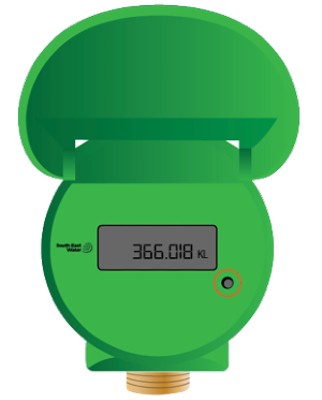
1. Lift the lid to open. Light sensor is located on the right-hand side of the meter as displayed above.
2. To scroll through the information on the screen cover the light sensor for three seconds*.
*If it is dark outside, you may need to use a torch over the screen to turn it on and change screens. If that does not work, cover and uncover the light sensor while shining the torch on the meter face.
3. The first screen you'll see is the total usage reading. This reading tells you how many kilolitres (1kL=1000 litres) of water has passed through your meter since we installed it. The numbers before the decimal point represent kilolitres (1,000 litres). You only need to check the numbers before the decimal point.

If this error icon appears, you can ignore it.

Related information
If this isn’t what you were looking for, see the following links for more information: